
Instructions: Check Your Status
You have applied and received access to the Campusportal. Here you will find information on where to find your status and what it actually means.
How Can You Find Out the Status of Your Application?
Step 1
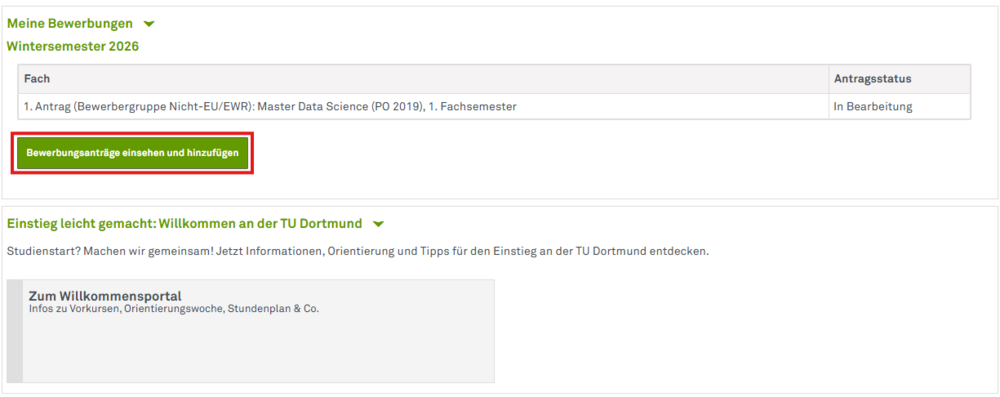
First log in to the Campusportal. In the overview of your applications, click on View and add applications.
Step 2
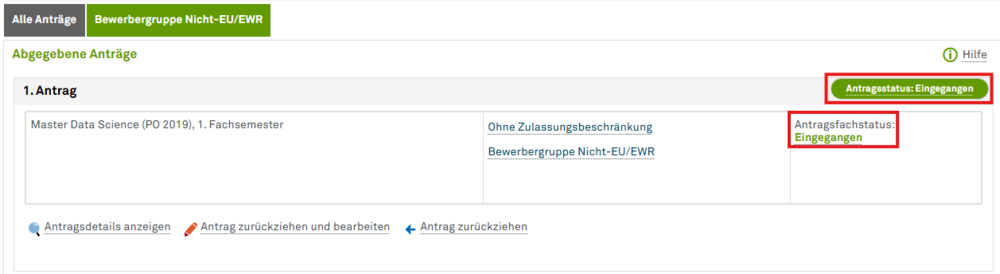
Your application status and application subject status are shown in the Campusportal: A combination of both will tell you the status of your application. You should therefore use the table below as a guide.
What Is the Status of Your Application?
| Application status | Application status | Meaning |
| Received | Received | We have received your application and will process it as soon as possible. |
| In process | Received | We have received your application and are currently processing it. |
| In process | Provisionally excluded | This can mean two things: Either you will find a request to submit documents later or you have received a language course notification(if you have applied for a German-language degree program and your application has been fully processed). Check the Campusportal to see which situation applies to you. |
| Free of admission | Free of admission | Check your inbox. You have received a letter of admission. |
| Excluded | Excluded | Check your inbox. You have received a rejection notice. |
| Withdrawn | You have withdrawn your application. If you want to cancel this, please contact us. We will check this. You must submit further applications via uni-assist again in due time and form. |
What Do You Need to Do Now?
Check your status in the Campusportal regularly. It makes sense to activate the e-mail notifications. Thank you for your patience!