
Instructions: Find Your Notification Letter
Have you applied and received notification that a new document is ready for you in the campus portal? Here you will find information on where to find the decision/notification (?).
Instructions
Step 1
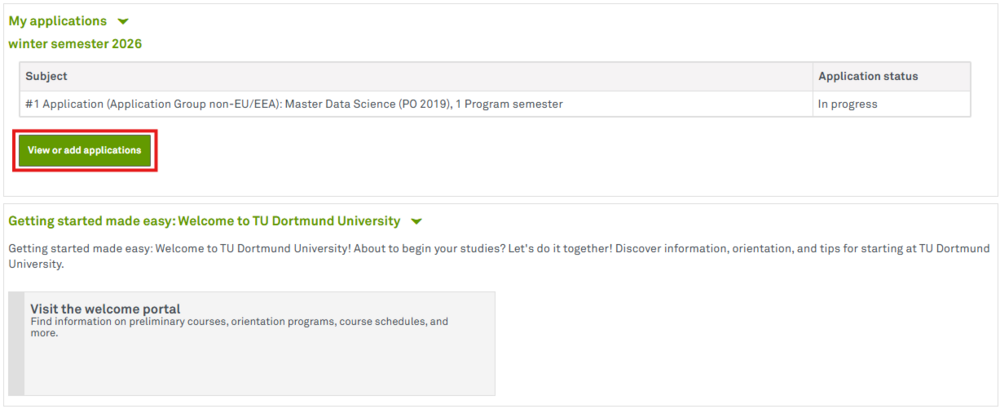
First log in to the campus portal. In the overview of your applications, click on View and add applications.
Step 2
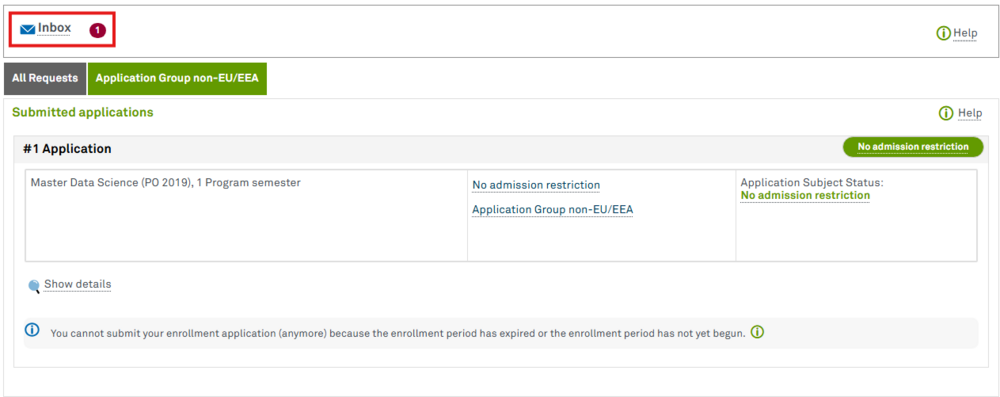
The inbox is marked with a red one, which means that there is an unopened document. Please click on Inbox.
Step 3
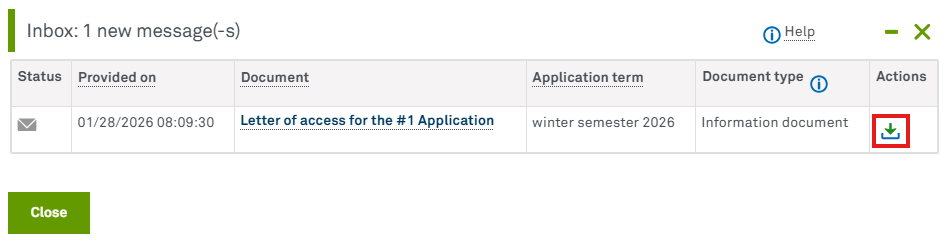
Your inbox opens. Documents that you have not yet opened are highlighted in bold. Click on the download icon on the right under Actions. Alternatively, you can click on the document name. Your notification should open in a new tab or window as a pdf document. We advise you to download it.
What Happens After I Receive a Decision?
If you receive a letter of admission, you will find information on the period of validity of your letter, possible conditions and enrollment deadlines.
Please contact us:
By mail:
Technische Universität Dortmund
Referat Internationales
- Admissions & Enrollment Office -
Emil-Figge-Str. 61
44227 Dortmund
By e-mail: admission.inquiriestu-dortmundde // We do not review documents or degrees in advance and therefore cannot make any statements regarding admission eligibility.
By telephone: +49 (0) 231 755-6349 // If you have any questions, we are happy to assist you by phone on the following days:
- Wednesday: 12:00 p.m. - 14:00 p.m.
- Thursday: 10:00 - 12:00 p.m. // The appointments on February 5 and February 12 are canceled.
If you are unable to reach us, we are likely in a meeting. Please try again later.
In person at the International Office: Tuesdays 1:00 p.m. - 3:30 p.m., only possible with an appointment. // Please note: The dates are released for booking one week in advance. If no dates are selectable, all dates are already booked.
In person via Zoom: Zoom consultation hour (meeting ID: 946 3737 6331, access code: 360707) // The following day, we are available via Zoom without prior appointment:
- Monday: 1:00 p.m. - 3:00 p.m. // The appointment on February 2 is canceled.