
Apply for Enrollment
You have received a letter of access/admission. Here you will find information on how to apply for enrollment.
If you're looking for specific information on this page, you can also filter by heading.
Change of Degree Program
If you are already enrolled at TU Dortmund University and wish to change your degree program, you must still apply for enrollment in your new degree program via the Campus Portal. You don't need to send us an email to do this.
German Course Registration
Please send us proof of enrollment in a preparatory German course taking place during the desired semester (see green tile). Only then will we activate your enrollment as a German course student in the campus portal.
Send an email
Click here to send us an email directly, along with your registration confirmation for the preparatory German course.
How Do You Apply for Enrollment?
Step 1
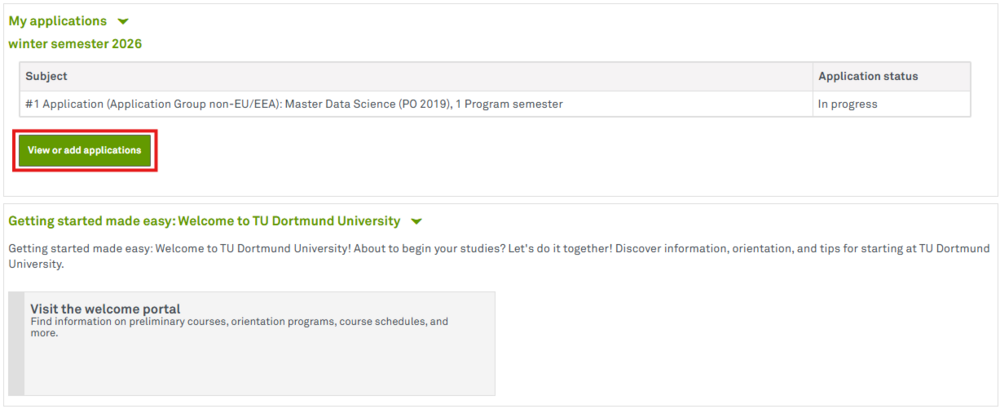
First, log in to the Campus Portal. On the overview page of your applications, click View or add applications.
Step 2
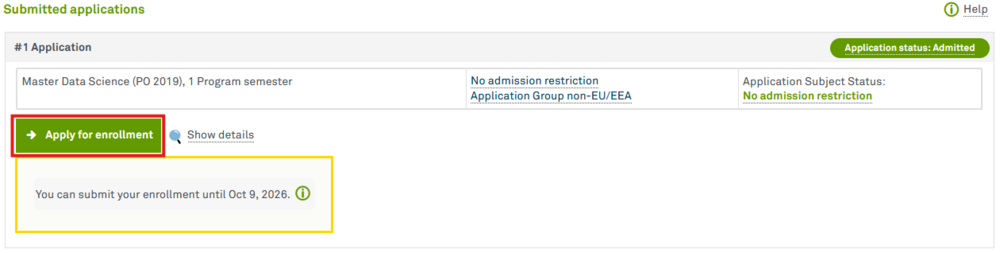
On the overview of your applications, click Apply for enrollment. The enrollment deadline is listed in the yellow box.
Step 3
Please fill out all the required information for online registration, especially the details regarding your previous studies (if applicable) and your insurance status. Please note that even if you are exempt from the mandatory health insurance requirement, you must still contact a statutory health insurance provider. The statutory health insurance provider will send us proof of your exemption.
Further Explanations
Contact details
Studies background→ Information about your studies in the semester prior to the current semesterPlease list every degree program you have started, even if you did not complete it or if you are currently interrupting your studies. → Degree, Type of program:
Stays Abroad
|
Step 4
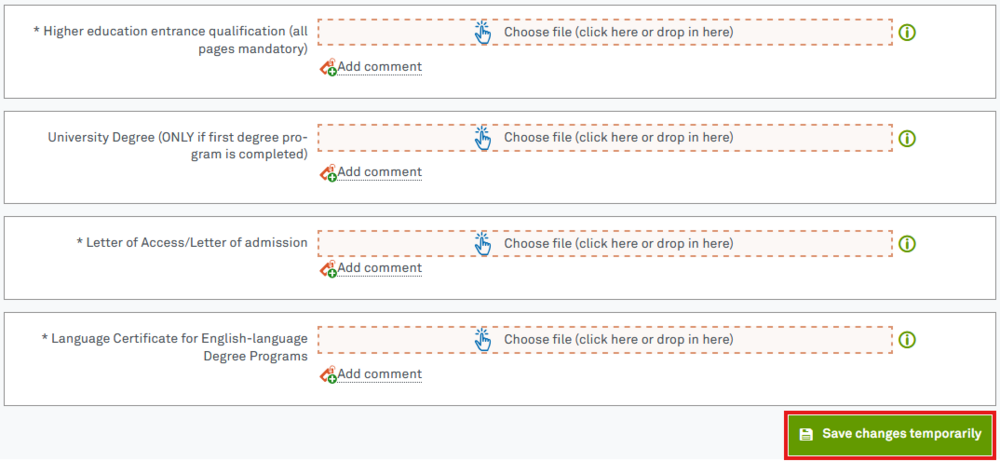
Please upload all required documents by either selecting the file or dragging it into the field. Please save the uploaded documents by clicking the green Save changes temporarily button.
Step 5
Click the orange button Finish and charge fees. You will then see the payment reference (purpose) and the semester contribution due.
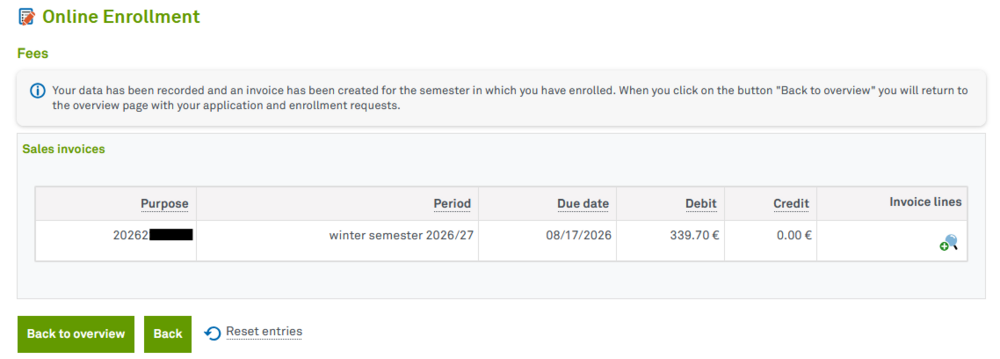
Generally, payment is due 14 days after you receive the document “Further Information on Enrollment.” We do not send out a payment confirmation for the semester fee. You can check the Campus Portal to see if the payment has been credited to your account, so there is no need to send us proof of payment .
What happens after I apply for enrollment?
Your application for enrollment is still being reviewed. This process may take several weeks. We therefore recommend that you apply for enrollment well in advance.
Once your proof of health insurance, the semester contribution, and all required documents have been submitted, you will be fully enrolled and will receive further information regarding your enrollment. If your proof of health insurance or the semester contribution is missing, you will initially be enrolled on a provisional basis. As soon as both are submitted, you will then be automatically enrolled.
You can then download your certificate of enrollment in both German and English on your own via the Campus Portal.
The International Student Advisors serve as points of contact for international students in each department. This is the contact person you can list on your visa application.
Please contact us:
By mail:
Technische Universität Dortmund
Referat Internationales
- Admissions & Enrollment Office -
Emil-Figge-Str. 61
44227 Dortmund
By e-mail: admission.inquiries@tu-dortmund.de // We do not review documents or degrees in advance and therefore cannot make any statements regarding admission eligibility.
By telephone: +49 (0) 231 755-6349 // If you have any questions, we are happy to assist you by phone on the following days:
- Tuesday: 1 p.m. - 3 p.m.
If you are unable to reach us, we are likely in a meeting. Please try again later.
For important matters, you can use the Zoom consultation hours or schedule an individual appointment.
In person via Zoom: Zoom consultation hour (meeting ID: 946 3737 6331, access code: 360707) // The following day, we are available via Zoom without prior appointment:
- Monday: 1 p.m. - 3 p.m.